Documents & print
How to design a multi-page order of service or booklet
A multi-page design needs more planning than a single poster. The words have to flow, the page order has to make sense and the finished file needs a careful proof. Whether you are preparing an order of service, a short book of poems or a small information booklet, a simple structure gives you a calmer starting point. Begin with the content, then build the pages around it.
Collect the content before arranging pages
Gather the exact wording, names, dates, photographs and any required acknowledgements in one place. For an order of service, agree the running order with the people organising the event. For a poem collection, decide which pieces are included and whether each should begin on a new page. A layout is much easier to organise when the content is reasonably settled.
Keep a source copy of the approved words outside the design. That gives you something reliable to compare against during proofreading. Check permissions for poems, song lyrics, photographs and illustrations before reproducing them. Having a copy of a work does not automatically mean you can print it in a booklet. If a venue or organiser supplies required wording, use the current version they approve.
Choose the page size and reading format
Decide whether the document will be read on screen, printed as separate pages or folded into a booklet. The page size and orientation affect how much text fits comfortably. Ask the printer about their requirements before building a long design. A PDF page sequence for screen reading is not necessarily the same as a printer’s imposed booklet layout.
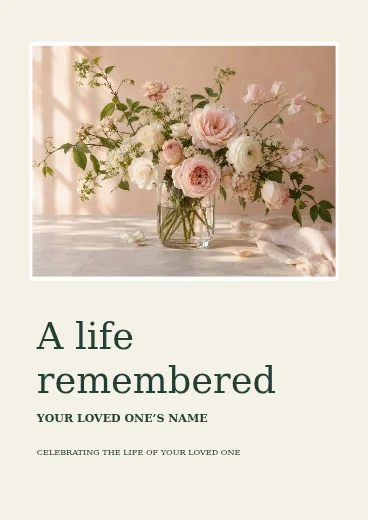
Start in the document editor or choose a suitable example from Studio templates. The order of service example shown here uses a restrained layout so the words stay central. A poem booklet might use a similar quiet structure, while an information booklet may need more headings, photographs and short sections.
Make a page plan in plain words
Write a short list of what belongs on each page before adjusting fonts. A simple order of service might have a cover, a welcome, the running order, selected readings and a closing acknowledgement. The final number of pages depends on the content and the intended print format. Do not force a long reading onto one page just to match an early guess.
Use the editor’s page controls to create the sequence you need, and keep checking the order as pages are added or moved. For a printed folded booklet, the printer may require a page count compatible with the way sheets are folded. Confirm that requirement directly. Avoid rearranging pages into printer spreads unless the printer specifically asks you to supply them that way.
Set a consistent text structure
Choose a small set of roles: the main title, section headings, body text and any captions. Reuse those roles across the pages. Consistent headings make the document easier to follow; consistent body text makes it feel considered. Leave comfortable space at the edges and between paragraphs, especially if people will read the booklet in lower light.
Read a sample at its actual output size. Text that looks large on a zoomed-in editor may be too small on paper. Avoid a decorative typeface for a whole reading or poem. If the material does not fit, consider another page before reducing every line. A clear, slightly longer booklet is often easier to use than a cramped shorter one.
Place photographs without losing the person or detail
Choose a sharp original photograph and crop with care. A face near an edge can be clipped when the image is resized or the document is trimmed. Leave space around important details and avoid stretching a photograph to fit a frame. If the proportions do not match, use a different crop or layout rather than distorting the image.
The crop tool helps prepare a suitable composition before it goes onto the page. A quiet background can keep the photograph readable, but heavy editing is not always needed. If a cutout would help, read the background removal guide. For a personal or memorial document, choose an image that the people involved are comfortable sharing.
Proofread in more than one way
First compare the wording with the approved source. Then check the layout separately: headings, spacing, image crop, missing lines and page order. Reading aloud can reveal a repeated word or an awkward line break that your eye skips. Ask another person to check names and dates, because familiarity makes those errors easy to miss.
For an event document, check that the sequence matches the actual arrangements and that last-minute changes have been included everywhere. If a page is replaced, revisit any contents list or references to page order. Keep one clearly named final version and avoid sending a file that still contains placeholder words from the template. A short pause for proofing is particularly valuable when the document carries personal meaning.
Export, inspect and test the PDF
Choose a supported PDF export and open the downloaded file. Move through every page in order and check the first and last lines of each section. Make sure no important text is clipped and that photographs look as intended. Our download format guide explains why a PDF and an editable project copy serve different purposes.
If you are printing, produce a test copy or ask the printer for a proof before committing to a quantity. Check size, margins, readability and folding. Keep the editable project as well as the PDF so an agreed correction can be made without starting again. Return to the workspace for edits and use the download help page if the file does not appear where expected.
Questions & answers
Can I create more than one page?
The Studio editor supports multi-page designs. Use its page controls to add and organise the pages, then inspect the whole export.
Should I arrange the pages for booklet printing myself?
Ask the printer. Reading-order pages and imposed printer spreads are different, and supplying the wrong arrangement can cause problems.
Can I include poems or song lyrics?
Only where you have the necessary permission or another lawful basis. Check the rights for the specific work rather than assuming that an event use is automatically permitted.
How can I check the text size?
View or print the document at its intended physical size. A zoomed-in editor is not a reliable guide to paper readability.
What should I keep after finishing?
Keep the final PDF, an editable project copy and the approved source words and photographs in a clearly named folder.
Try an idea of your own.
Explore templates, photo tools and everyday utilities, or return to all creative guides.